> ## Documentation Index
> Fetch the complete documentation index at: https://gofastmcp.com/llms.txt
> Use this file to discover all available pages before exploring further.
# Development
> Preview and test your app tools locally without a full MCP host.
export const VersionBadge = ({version}) => {
return
New in version {version}
;
};
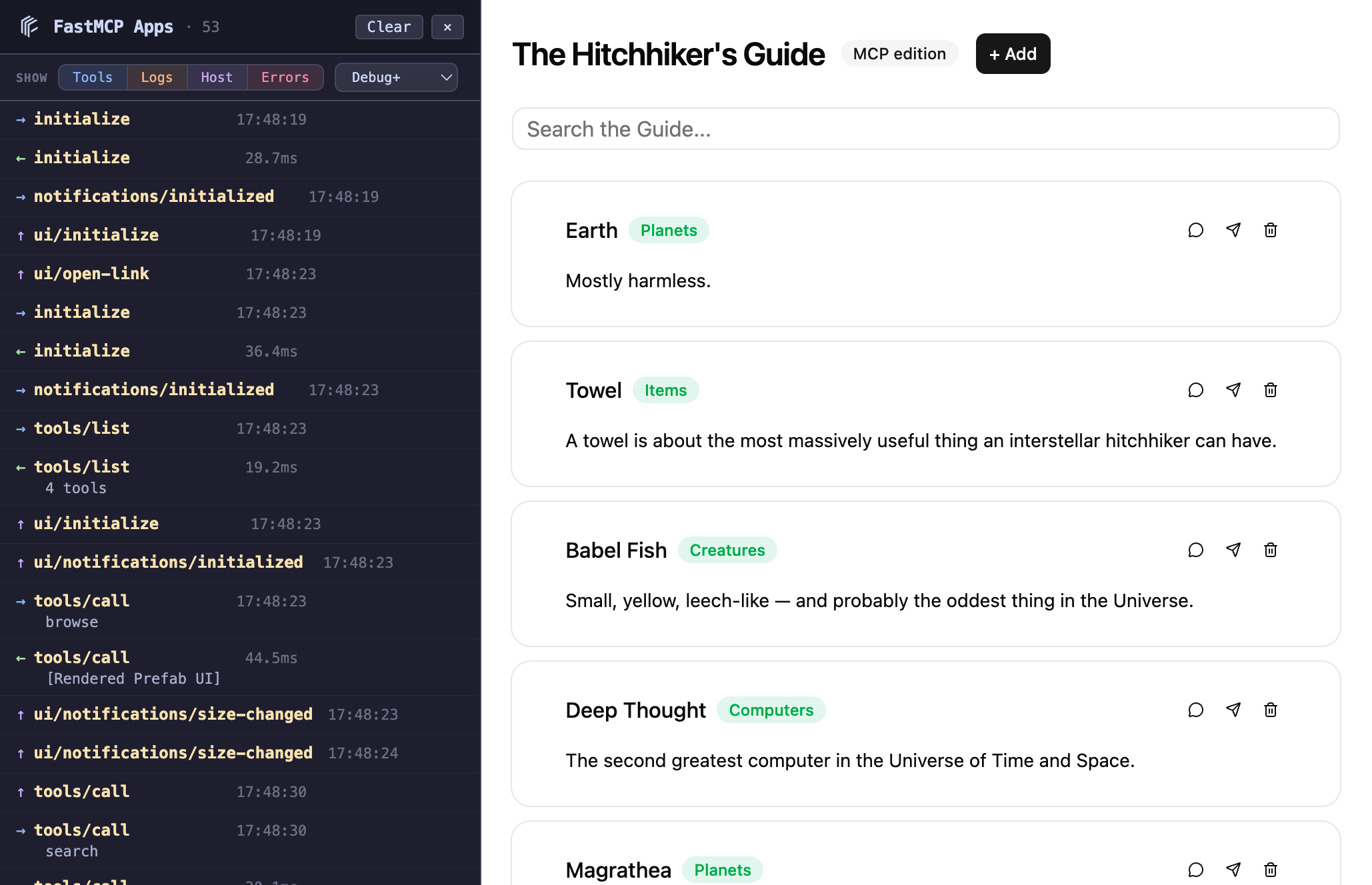 `fastmcp dev apps` gives you a browser preview for your app tools without needing an MCP host client. It starts your server and a local dev UI side by side: you pick a tool, fill in its arguments, and the rendered result opens in a new tab.
Works with both [Interactive Tools](/apps/prefab) and [custom HTML apps](/apps/low-level).
## Quick start
```bash theme={"theme":{"light":"snazzy-light","dark":"dark-plus"}}
fastmcp dev apps server.py
```
The dev UI opens in your browser on port 8080 through a startup URL that the terminal prints. Each run prints a new URL; open it to use the dev UI in another browser or after closing the tab. Your MCP server runs on port 8000 with auto-reload enabled by default — save a file and the server restarts automatically.
## How it works
The dev server does three things:
The **picker page** connects to your MCP server, finds all tools with UI metadata, and renders a form for each one. The forms are auto-generated from the tool's input schema — text fields, dropdowns, checkboxes, all wired up.
When you submit a form, the dev server **calls your tool** via the MCP protocol and opens the result in a new tab. Each result page comes from a picker launch and stays available, including on reload, until the dev server stops. The result page loads the tool's UI resource (the Prefab renderer or your custom HTML) inside an AppBridge — the same protocol that real MCP hosts use. The resource runs in a sandboxed iframe, so it can't use `localStorage`, open popups, or show `alert` and `confirm` dialogs.
A **reverse proxy** on `/mcp` forwards requests from the browser to your MCP server, avoiding CORS issues that would otherwise block the iframe-based renderer from talking to a different port.
## MCP inspector
The dev UI includes an inspector panel on the left side that captures MCP traffic in real time. It shows JSON-RPC messages flowing between the browser and your server — requests, responses, and AppBridge `postMessage` traffic.
Each entry shows direction, method, timing, and a smart summary. Click any entry to expand the full JSON-RPC body. The panel auto-scrolls to new messages unless you've scrolled up to inspect older ones.
The inspector is useful for debugging: you can see exactly what arguments your tool received, what it returned, and how the AppBridge communicated with the renderer.
## Options
```bash theme={"theme":{"light":"snazzy-light","dark":"dark-plus"}}
fastmcp dev apps server.py:mcp --mcp-port 9000 --dev-port 9090 --no-reload
```
| Option | Flag | Default | Description |
| - | - | - | - |
| MCP Port | `--mcp-port` | `8000` | Port for your MCP server |
| Dev Port | `--dev-port` | `8080` | Port for the dev UI |
| Auto-Reload | `--reload` / `--no-reload` | On | Watch files and restart the server on changes |
| Host | `--host` | `127.0.0.1` | Interface for both local servers to bind |
| Log Panel | `--log-panel` / `--no-log-panel` | On | Show or hide the log panel in the dev UI |
With `--host 0.0.0.0`, open the dev UI through `localhost` or an IP address. To reach it by hostname, pass that hostname to `--host`.
## Multiple tools
If your server has multiple app tools, the picker shows a dropdown. Each tool gets its own form and launch button. The tool's `title` is displayed when available, falling back to the tool name.
```bash theme={"theme":{"light":"snazzy-light","dark":"dark-plus"}}
# Server with multiple app tools
fastmcp dev apps examples/apps/contacts/contacts_server.py
```
This documentation is built and hosted on [Mintlify](https://mintlify.com), a developer documentation platform.
`fastmcp dev apps` gives you a browser preview for your app tools without needing an MCP host client. It starts your server and a local dev UI side by side: you pick a tool, fill in its arguments, and the rendered result opens in a new tab.
Works with both [Interactive Tools](/apps/prefab) and [custom HTML apps](/apps/low-level).
## Quick start
```bash theme={"theme":{"light":"snazzy-light","dark":"dark-plus"}}
fastmcp dev apps server.py
```
The dev UI opens in your browser on port 8080 through a startup URL that the terminal prints. Each run prints a new URL; open it to use the dev UI in another browser or after closing the tab. Your MCP server runs on port 8000 with auto-reload enabled by default — save a file and the server restarts automatically.
## How it works
The dev server does three things:
The **picker page** connects to your MCP server, finds all tools with UI metadata, and renders a form for each one. The forms are auto-generated from the tool's input schema — text fields, dropdowns, checkboxes, all wired up.
When you submit a form, the dev server **calls your tool** via the MCP protocol and opens the result in a new tab. Each result page comes from a picker launch and stays available, including on reload, until the dev server stops. The result page loads the tool's UI resource (the Prefab renderer or your custom HTML) inside an AppBridge — the same protocol that real MCP hosts use. The resource runs in a sandboxed iframe, so it can't use `localStorage`, open popups, or show `alert` and `confirm` dialogs.
A **reverse proxy** on `/mcp` forwards requests from the browser to your MCP server, avoiding CORS issues that would otherwise block the iframe-based renderer from talking to a different port.
## MCP inspector
The dev UI includes an inspector panel on the left side that captures MCP traffic in real time. It shows JSON-RPC messages flowing between the browser and your server — requests, responses, and AppBridge `postMessage` traffic.
Each entry shows direction, method, timing, and a smart summary. Click any entry to expand the full JSON-RPC body. The panel auto-scrolls to new messages unless you've scrolled up to inspect older ones.
The inspector is useful for debugging: you can see exactly what arguments your tool received, what it returned, and how the AppBridge communicated with the renderer.
## Options
```bash theme={"theme":{"light":"snazzy-light","dark":"dark-plus"}}
fastmcp dev apps server.py:mcp --mcp-port 9000 --dev-port 9090 --no-reload
```
| Option | Flag | Default | Description |
| - | - | - | - |
| MCP Port | `--mcp-port` | `8000` | Port for your MCP server |
| Dev Port | `--dev-port` | `8080` | Port for the dev UI |
| Auto-Reload | `--reload` / `--no-reload` | On | Watch files and restart the server on changes |
| Host | `--host` | `127.0.0.1` | Interface for both local servers to bind |
| Log Panel | `--log-panel` / `--no-log-panel` | On | Show or hide the log panel in the dev UI |
With `--host 0.0.0.0`, open the dev UI through `localhost` or an IP address. To reach it by hostname, pass that hostname to `--host`.
## Multiple tools
If your server has multiple app tools, the picker shows a dropdown. Each tool gets its own form and launch button. The tool's `title` is displayed when available, falling back to the tool name.
```bash theme={"theme":{"light":"snazzy-light","dark":"dark-plus"}}
# Server with multiple app tools
fastmcp dev apps examples/apps/contacts/contacts_server.py
```
This documentation is built and hosted on [Mintlify](https://mintlify.com), a developer documentation platform.